
6 BREEAM Platform
Information correct as of 20thOctober 2026. Please see kb.breeam.com for the latest compliance information.
Amber (orange) traffic light – What does this mean in an assessment? - KBCN1789
An amber (orange) traffic light means this part of the assessment has been edited by someone other than the Named Assessor, and the Named Assessor has not yet verified the edits.
Assessor organisation users – What are the different roles and permissions in the BREEAM Platform? - KBCN1779
The BREEAM Platform defines multiples roles for Assessor organisation users, each with distinct responsibilities and access levels. It’s possible for a user to have multiple roles.
Roles and permissions for Assessor organisation users include:
- Assessor Organisation Administrator – this role allows users to manage assessor organisation, its assets, assessments, users and permissions.
- User Administrator – this role allows users to manage user permissions for the assessor organisation.
- Assessment Administrator – this role allows users to view, manage and assign all assessments for the assessor organisation.
- Assessment Manager – this role allows users to create assessments and manage assessments assigned to them.
- Assessment Contributor – this role allows users to view assets and edit assessments assigned to them.
- Assessment Stakeholder – this role allows users to view assets and assessments assigned to them. They cannot view assessment evidence.
Can an assessment be created without an asset? - KBCN1784
No. An asset must be created before an assessment can be created.
Can the assessor update the ‘certificate release’ field after submission? - KBCN1794
It’s not possible to edit the ‘certificate release’ field if the assessment has been submitted, and is with BRE.
However, the ‘certificate release’ field will become editable again if the assessment is returned to the assessor prior to certification.
Can the certificate be released to the assessor only, initially, and then be issued to the asset owner later? - KBCN1795
Yes. If the assessor has selected ‘assessor only’ in the ‘certificate release’ field, upon certification, the BREEAM Platform will release the certificate to the assessor only.
When the assessor is ready, they will be able to release the certificate to the asset owner through the certificate page of the assessment.
Client organisation users – What are the different roles and permissions in the BREEAM Platform? - KBCN1778
The BREEAM Platform defines multiples roles for Client organisation users, each with distinct responsibilities and access levels. It’s possible for a user to have multiple roles.
Roles and permissions for Client organisation users include:
- Organisation Administrator – this role allows users to manage the organisation, its assets, assessments, users and permissions.
- User Administrator – this role allows users to manage user permissions for the organisation.
- Asset Administrator – this role allows users to view and manage all assets for the organisation. They are also able to assign assets to the appropriate users within the organisation.
- Asset Manager – this role allows users to create and manage assets assigned to them.
- Asset Contributor – this role allows users to edit assets assigned to them.
Green traffic light – What does this mean in an assessment? - KBCN1790
A green traffic light means this part of the assessment has been verified by the Named Assessor.
Grey traffic light – What does this mean in an assessment? - KBCN1788
A grey traffic light means that there have been no edits or actions taken in this part of the assessment.
How can I become an Assessor user? - KBCN1780
To become an Assessor, a delegate must successfully complete an accredited assessor course (
BREEAM training courses | BRE Academy) and obtain a licence.
BRE will then activate Assessor-specific account features, ensuring compliance with the necessary guidelines.
Assessor accounts are managed by BRE.
How can my role be updated in the BREEAM Platform? - KBCN1781
The ’Organisation Administrator’ role within your organisation will be able to make changes to your assigned role and permissions.
For licensed assessors, if you need to make any changes to your licenses, please contact the BREEAM Licensing team via the
webform.
I am an assessor. How should I create an account on the BREEAM Platform? - KBCN1776
Assessor email credentials have been migrated from BREEAM Projects to the BREEAM Platform.
On first entering the BREEAM Platform, you will be required to verify your email address (this must be the one linked to your licence), and create a password.
To do this:
|
1. Go to the BREEAM platform landing page https://platform.breeam.com and click the “Login” button
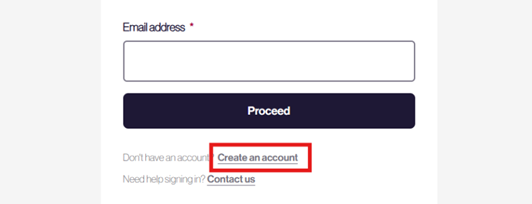
2. On the Welcome back page, click the “Create an account” link (see image below). Do not enter your email address at this stage.
3. You will be taken to the Create an account page. Enter the email address linked to your assessor licence and click “Send verification code”.
4. You will receive a 6-digit verification code in an email from BRE. Enter the code into the “Verification code” box and click “Verify code”.
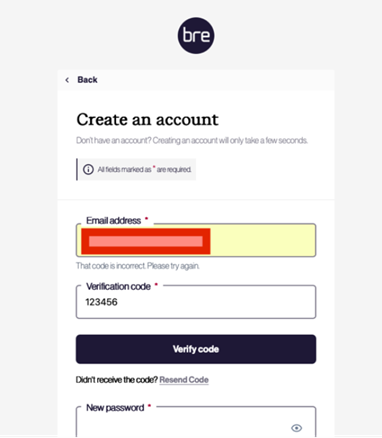
- If the verification code is not recognised, an error message “That code is incorrect. Please try again” will be displayed – check the code and re-enter
- If the code is still not recognised, click on “Resend Code”
5. Enter and confirm your new password for the platform. Your password must be between 12 and 64 characters. Then complete the form with your display name, first name and last name.
6. After reading the Privacy Policy and Terms of Service, tick the confirmation box.
7. Finally, click on “Create” to create your account and add your user details to the BREEAM Platform.
Upon completion, you will enter the BREEAM Platform as an assessor.
|
I am an assessor. What should I do if my email address is incorrect in the BREEAM Platform? - KBCN1777
Assessor accounts are managed by BRE.
If you need to make any changes to your email address, you must contact the BREEAM Licensing Team via the webform to update it.
Assessor email details cannot be changed in the BREEAM platform, and you should not use a different email address as this will not link to your licensed assessor account or enable you to verify your email address.
Is the BREEAM Platform exclusively for Version 7 assessments, or will it also support Version 6 and other versions? - KBCN1917
The BREEAM Platform has been initially launched with Version 7 schemes, starting with New Construction. In the longer term, we aim to incorporate older BREEAM scheme versions into the platform.
Red traffic light – What does this mean in an assessment? - KBCN1791
A red traffic light means that the Named Assessor has reviewed this part of the assessment, and there are outstanding actions that must be addressed.
What does it mean to transfer an asset? - KBCN1786
Transferring an asset means moving ownership of the asset to another organisation. Please be aware that there can only be one asset owner at any time.
If an asset owner changes, the BREEAM platform allows an asset to be transferred to the new owner. Existing asset owners will be able to select the amount of information (associated asset and assessment information) they wish to transfer.
When an assessment is certified, does the BREEAM Platform release the certificate to the client? - KBCN1793
Not without instruction from the assessor. The BREEAM Platform allows assessors to choose how they would like certificates to be released.
The ‘Certificate release’ field on the ‘Submit assessment’ page asks the assessor to confirm who the BREEAM Platform should make the certificates available to once a successful certificate decision has been made by QA for the assessment. They need to confirm whether certificates should be available to:
or
When creating a new asset, should I select my organisation as the Owner or the Assessor? - KBCN1782
Your organisation name will define the available options as follows:
- If you are not an active licensed assessor, you will only be able to select owner.
- If you are an active licensed assessor, you can select either owner or assessor. You must select assessor to allow you to submit the assessment to BRE.
23-Sep-2026 - Wording clarified
Where are traffic light indicators shown in the BREEAM platform? - KBCN1792
Traffic light indicators appear in assessments. They are displayed in the navigation panel on the left against the overall assessment, parts, categories, issues or parts of issues.
Who can appoint an assessor to an assessment? - KBCN1785
An asset owner can assign an assessment to a Licensed assessor.
The organisation administrator in a licensed assessor organisation is able to allocate/reallocate assessments to licensed assessors within their organisation.
Who can create an asset? - KBCN1783
Client and assessor users are both able to create an asset.
Who can register a V7 assessment on the BREEAM Platform? - KBCN1787
Assessments can only be registered by a BREEAM assessor who is licensed under the relevant scheme.
23-Sep-2026 - Wording updated
Information correct as of 20thOctober 2026. Please see kb.breeam.com for the latest compliance information.